
 +1 619-743-9389
Thermador Range Home Connect Update Errors E0211 E1601 E0510
A Thermador range Home Connect update errors E0211 E1601 E0510 issue usually means the range is having trouble completing a connected update or communicating with the Home Connect app. The display may show one of these codes, the app may lose the range, or the update may start but fail before it finishes.
For homeowners in San Diego, CA, this can be confusing because the cooking parts of the range may still look normal, while the connected features stop working. The issue may involve Wi-Fi, app pairing, account sync, software communication, or the appliance’s internal control system.
What This Problem Usually Means
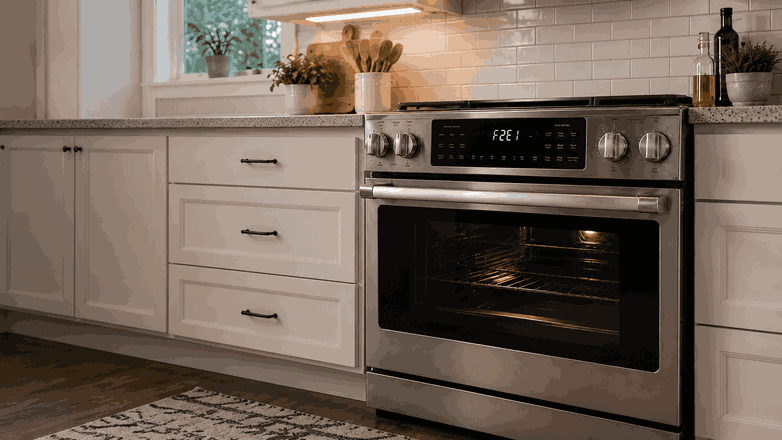
When a Thermador range shows E0211, E1601, or E0510 during a Home Connect update, the appliance is usually reporting a communication problem. The range may not be able to download, install, confirm, or complete the update process.
This does not always mean the range has a major hardware failure. Sometimes the cause is a weak Wi-Fi signal, router interruption, app issue, or a failed pairing attempt.
At the same time, the range depends on internal control electronics to manage connected features. If the code keeps returning after basic network checks, the issue may be inside the appliance rather than only in the phone or router.
Common Signs of the Problem
E0211, E1601, or E0510 Code on the Display
The clearest sign is an E0211, E1601, or E0510 code on the range display. It may appear during setup, after an app update, or when the appliance tries to finish a Home Connect process.
Home Connect App Shows the Range Offline
You may also notice that the Home Connect app shows the range as offline, unavailable, or stuck updating. The app may not match what the appliance display shows.
Repeated Update Prompt
Another sign is a repeated update prompt. The range may seem to begin updating, then stop, restart, or return to the same warning.
Slow Controls or Locked Error State
In some cases, normal cooking functions still work. In others, the control panel may respond slowly, beep, cancel settings, or keep the display locked in an update-related error state.
Most Common Causes
Weak or Unstable Wi-Fi Connection
One common cause is a weak or unstable Wi-Fi connection near the kitchen. Connected updates need a steady signal. If the connection drops during the process, the range may not complete the update.
App Pairing or Account Sync Problem
Another possible cause is an app pairing or account sync problem. The Home Connect app may lose connection with the range, fail to confirm appliance status, or keep showing the wrong connection state.
Failed Software Update
A failed software update can also trigger these errors. If the update was interrupted by a power outage, router issue, app timeout, or phone connection problem, the range may keep trying to complete the same process.
Communication Module or Control Electronics Issue
There may also be a problem with the range’s communication module or control electronics. If the appliance cannot process the update correctly, the error may return even when the home network works normally.
Recent Network or Account Changes
In some cases, the issue begins after a router replacement, Wi-Fi password change, new phone setup, app update, or Home Connect account change.
What Homeowners Can Check First
Check Wi-Fi Stability Near the Kitchen
Start by checking whether other devices near the kitchen have a stable Wi-Fi connection. If phones or tablets lose signal in the same area, the range may also struggle to stay connected.
Check the Home Connect App
Open the Home Connect app and check whether the range appears online, offline, or stuck in an update state. Make sure the app is updated on your phone.
Review Recent Wi-Fi Changes
Confirm whether your Wi-Fi name or password changed recently. If it did, the range may need to be reconnected through the app.
Try One Basic Power Reset
You can also try a basic power reset at the household breaker. After power is restored, watch whether the same code returns or the update fails again.
Avoid Unsafe Internal Checks
Avoid opening the range, removing panels, touching internal electronics, or trying to force updates through unsafe methods. Connected range errors involve both software communication and appliance controls.
When Professional Service Makes Sense
Professional service makes sense when the Thermador range Home Connect update errors E0211 E1601 E0510 issue keeps returning after Wi-Fi, app, and power checks. It is also the right step if the range display stays stuck, the app cannot reconnect, or normal oven functions are affected.
A Thermador range uses connected controls along with oven and cooking systems. If the problem is not limited to the home network, the appliance may need diagnosis of its control board, communication module, wiring, or software response.
For homeowners in San Diego, CA, professional range service can help separate a simple connection problem from an internal appliance fault. This helps avoid repeated failed updates, unnecessary app resets, and guesswork.
Related Support Information
Because these warnings appear as display codes, a related Thermador range error codes page can provide extra context. Still, the main issue is the update and communication behavior, not the code list itself.
Conclusion
A Thermador range Home Connect update errors E0211 E1601 E0510 issue usually points to a Wi-Fi, app pairing, software update, or control communication problem. Safe checks can help rule out simple connection causes, but repeated update failures or a display that will not clear usually call for professional range service in San Diego, CA.
Related Thermador Range Troubleshooting Guides
Use these Thermador range resources to connect Home Connect update errors E0211, E1601, or E0510 with relevant error codes and another closely related control issue.
Thermador Range Error Codes: Start with Thermador Range Error Codes when the appliance displays a diagnostic message related to Home Connect, software updates, electronic communication, controls, or range operation.
Thermador Range Oven Error Code Beeping and Not Clearing: Review Thermador Range Oven Error Code Beeping and Not Clearing when a warning remains on the display, produces repeated alerts, or prevents normal oven operation.
These related guides help homeowners connect Thermador range Home Connect update errors E0211 E1601 E0510 with diagnostic codes and persistent control-panel warnings.
Contact Information
Reset Appliance Repair – San Diego, CA
📍 Address: 11031 Via Brescia, San Diego, CA 92129
📧 Email: resetappliance@gmail.com
☎️ Phone: +1 619-743-9389
🕒 Open Hours: Monday – Sunday: 7:00 AM – 10:00 PM
